
در این آموزش دو روش اتصال گوگل شیت به ووکامرس را بررسی میکنیم.
در روش اول نحوه کار افزونه Bulk Product Sync را برررسی میکنیم و در روش دوم با استفاده از یک کد سفارشی گوگل شیت را به ووکامرس متصل میکنیم.
بهترین افزونه اتصال ووکامرس به Google Sheet
برای آپدیت قیمت محصولات ووکامرس با گوگل شیت ابتدا افزونه Bulk Product Sync را از مخزن وردپرس نصب کنید.

پس از نصب و فعالسازی از منوی ووکامرس روی BulkProductSync کلیک کنید تا راهنمای اتصال ووکامرس به گوگل شیت برایتان آورده شود.
یک گوگل شیت جدید بسازین و از منوی extensions به مسیر add-ons و get add-ons بروید.
در قسمت search apps عبارت Bulk Product Sync with Google Sheets رو سرچ و افزونه مربوطه رو برای گوگل شیت نصب کنید. هنگام نصب به این افزونه دسترسیهای لازم را بدهید.

بعد از نصب کردن افزونه حالا نوبت پیکربندی آن است، از منوی extensions به این مسیر بروید:
Bulk Product Sync with Google Sheets > setup
در مرحله اول آدرس سایت خود را وارد کنید.
در مرحله دوم کد تایید رو از پلاگین sync wc google که در وردپرس نصب کردهاید کپی و در اینجا جایگذاری کنید.
اکنون در گوگل شیت تعدادی شیت جدید ساخته میشه، برای اینکه اشتباها تغییری در آنها ایجاد نکنید بهتر همه آنها را پاک کنید و فقط setting و products را نگهدارید.

توجه: در تب setting اطلاعات اتصال ووکامرس به گوگل شیت قرار دارد، لطفا اطلاعات در آن را دستکاری نکنید.
در تب products، فقط ستون های id، name، regular_price ، sync و sale_price را نگه دارید و مابقی ستون ها را حذف کنید.
در مرحله بعد باید محتویات این ستونهایی که نگه داشتهاید را وارد کنید، میتوانید این کار را به صورت دستی انجام دهید یا از محصولات خود خروجی بگیرید و در گوگل شیت پیست کنید.
برای خروجی گرفتن از محصولات به پیشخوان وردپرس بروید، روی محصولات کلیک کنید و دکمه برونبری را بزنید. در صفحه برونبری فقط ستون های شناسه، نام، قیمت عادی و قیمت فروش ویژه را انتخاب کنید و فایل CVS محصولات خود را دانلود کنید.
در مرحله بعد این فایل را با اکسل باز کنید و ستونهای آن را در گوگل شیت و در تب products کپی کنید.

توجه : ستون sync باید خالی باشد.
حالا میتوانید قیمتها را در گوگل شیت ادیت کنید.
بعد از ادیت قیمتها در گوگل شیت از منوی extensions وارد Bulk Product Sync with Google و گزینه sync data را انتخاب کنید. در پنجره ای که باز میشود دکمه sync products رو انتخاب کنید.
زمانیکه با پیام سبز are updated successfully مواجه شدید، یعنی قیمت محصولات در سایت آپدیت شده است! اگر از افزونه کش استفاده میکنید باید بعد از هر آپدیت قیمت کش سایت را پاک کنید.
محدودیتهای این روش:
- در نسخه رایگان امکان fetch کردن محصولات به گوگل شیت وجود ندارد و باید دستی این کار را انجام دهید.
- هر بار برای آپدیت قیمت باید عبارت ok رو از ستون sync حذف کنید.
- نسخه رایگان این افزونه تا 100 محصول را ساپورت میکند.
- سرعت عملیات sync پایین است و احتمال ناموفق بودن آن بالا.
آپدیت قیمتهای ووکامرس از گوگل شیت با کد سفارشی
به داشبورد سایت خود بروید و از قسمت ووکامرس روی پیکربندی کلیک کنید، سپس به تب پیشرفته بروید و گزینه REST API را انتخاب کنید.
روی دکمه افزودن کلید کلیک کنید، یک توضیحات دلخواه برای آن بنویسید، مجوزها را روی خواندن/نوشتن قرار دهید و روی دکمه ساخت کلید API کلیک کنید.

در صفحه جدید کلید مصرف کننده و رمز مصرف کننده را دریافت خواهید کرد، این دو کلید را جایی نگهدارید چون بعدا از آنها استفاده خواهیم کرد.
اکنون یک گوگل شیت جدید باز کنید و به این مسیر بروید: Extensions > Apps Script
کد موجود در اسکریپت ادیتور را پاک کنید و کد زیر را در آن جایگذاری کنید.
نمایش کد
// @Update: https://mrnargil.ir/update-prices-from-google-sheets/

function constants() {
  var consumerKey = '0000000000000000000';
  var consumerSecret = '0000000000000000000';
  var siteUrl = 'https://0000000000000000000.com/';

  return [consumerKey,consumerSecret, siteUrl];
}

function onOpen() {
  var ui = SpreadsheetApp.getUi();
  ui.createMenu('WordPress')
    .addItem('Send Updated Prices', 'updateProductPrices')
    .addItem('Fetch Products', 'fetchProducts')
.addToUi();
  refreshUpdateColumn();
}

function fetchProducts() {
  var consumerKey = constants()[0];
  var consumerSecret = constants()[1];
  var siteUrl = constants()[2];
  siteUrl = siteUrl.replace(/\/$/, '');
  var ss = SpreadsheetApp.getActiveSpreadsheet();
  var tempFetchSheet = ss.getSheetByName("TempFetch");
  if (!tempFetchSheet) {
    tempFetchSheet = ss.insertSheet("TempFetch");
    var page = 1;
    tempFetchSheet.getRange("A1").setValue(page);
  } else {
	var pageValue = tempFetchSheet.getRange("A1").getValue();
	if (typeof pageValue === 'number') {
      var page = pageValue;
	} else {
	  var page = 1;
	}
  }
  var sheet = ss.getSheetByName('Products');
  var headers = ['ID', 'Type', 'SKU', 'Name', 'In stock?', 'Stock', 'Sale price', 'Regular price', 'Parent'];
  if ( page == 1 || !sheet )
  {
	    if (sheet) {
        ss.deleteSheet(sheet);
		}
		sheet = ss.insertSheet('Products');
	  if (sheet.getLastRow() === 0) {
		sheet.getRange(1, 1, 1, headers.length).setValues([headers]);
		sheet.getRange(1, 1, 1, headers.length).setFontWeight('bold');
	  }
	  page = 1;
  }
  var perPage = 10; // WooCommerce default max per page
  var currentRow = Math.max(sheet.getLastRow() + 1, 2); // Start after headers or last row
  while (true ) {
    var products = fetchProductBatch(siteUrl, consumerKey, consumerSecret, page, perPage);
    var productData = [];
    if (!products || products.length === 0) {
      break;
    }
    products.forEach(function(product) {
		SpreadsheetApp.flush();
      productData.push([
        product.id,
        product.type,
        product.sku,
        product.name,
        product.stock_status === 'instock' ? 1 : 0,
        product.stock_quantity || "",
        product.type === 'variable' ? '' : (product.sale_price || ''),
        product.type === 'variable' ? '' : (product.regular_price || product.price || ''),
        ''
      ]);
      // For variable products, fetch and write variations
      if (product.type === 'variable') {
        var variations = fetchVariations(siteUrl, consumerKey, consumerSecret, product.id);
        if (variations) {
          variations.forEach(function(variation) {
            productData.push( [
              variation.id,
              'variation',
              variation.sku,
              product.name + ' - ' + getVariationAttributes(variation),
              variation.stock_status === 'instock' ? 1 : 0,
              variation.stock_quantity || "",
              variation.sale_price || '',
              variation.regular_price || variation.price || '',
              "id:" + product.id
            ]);
          });
        }
      }
      // Auto-resize columns periodically (every 10 products)
      if (currentRow % 10 === 0) {
        sheet.autoResizeColumns(1, headers.length);
      }
    });
    if (productData.length > 0) {
		productData.forEach(function(product) {
			sheet.getRange(currentRow, 1, 1, headers.length).setValues([product]);
			currentRow++;
		});
      }
    page++;
    tempFetchSheet.getRange("A1").setValue(page);
    Utilities.sleep(500);
  }
  // Final auto-resize and hide columns
  sheet.autoResizeColumns(1, headers.length);
  hideColumns(sheet, ['Type', 'SKU', 'Parent'], headers);
  SpreadsheetApp.getActiveSpreadsheet().toast("Product fetching complete.", 'Success!');
  if (tempFetchSheet) {
    ss.deleteSheet(tempFetchSheet);
	}
  // add update check box
  refreshUpdateColumn();
}

function fetchVariations(siteUrl, consumerKey, consumerSecret, productId) {
  var endpoint = '/wp-json/wc/v3/products/' + productId + '/variations';
  var url = siteUrl + endpoint;

  // Set up parameters
  var params = {
    'per_page': 100  // Maximum variations per request
  };

  try {
    var response = makeAuthenticatedRequest(url, params, consumerKey, consumerSecret);
    return JSON.parse(response.getContentText());
  } catch (error) {
    Logger.log('Error fetching variations for product ' + productId + ': ' + error);
    return null;
  }
}

function getVariationAttributes(variation) {
  if (!variation.attributes || variation.attributes.length === 0) {
    return '';
  }

  return variation.attributes
    .map(function(attr) {
      return attr.option;
    })
    .join(', ');
}

function fetchProductBatch(siteUrl, consumerKey, consumerSecret, page, perPage) {
  var endpoint = '/wp-json/wc/v3/products';
  var url = siteUrl + endpoint;

  // Set up parameters
  var params = {
    'per_page': perPage,
    'page': page
  };

  try {
    var response = makeAuthenticatedRequest(url, params, consumerKey, consumerSecret);
    return JSON.parse(response.getContentText());
  } catch (error) {
    Logger.log('Error fetching products: ' + error);
    return null;
  }
}

function makeAuthenticatedRequest(url, params, consumerKey, consumerSecret) {
  // Create OAuth signature
  var timestamp = Math.floor(Date.now() / 1000);
  var nonce = Utilities.getUuid();

  var signatureBaseString = 'GET&' +
    encodeURIComponent(url) + '&' +
    encodeURIComponent(Object.keys(params)
      .sort()
      .map(function(key) {
        return key + '=' + encodeURIComponent(params[key]);
      })
      .concat([
        'oauth_consumer_key=' + consumerKey,
        'oauth_nonce=' + nonce,
        'oauth_signature_method=HMAC-SHA1',
        'oauth_timestamp=' + timestamp,
        'oauth_version=1.0'
      ])
      .sort()
      .join('&'));

  var signature = Utilities.computeHmacSignature(
    Utilities.MacAlgorithm.HMAC_SHA_1,
    signatureBaseString,
    consumerSecret + '&',
    Utilities.Charset.UTF_8
  );

  // Build authorization header
  var authHeader = 'OAuth ' +
    'oauth_consumer_key="' + consumerKey + '", ' +
    'oauth_nonce="' + nonce + '", ' +
    'oauth_signature="' + encodeURIComponent(Utilities.base64Encode(signature)) + '", ' +
    'oauth_signature_method="HMAC-SHA1", ' +
    'oauth_timestamp="' + timestamp + '", ' +
    'oauth_version="1.0"';

  var options = {
    'method': 'GET',
    'headers': {
      'Authorization': authHeader
    },
    'muteHttpExceptions': true
  };

  // Add parameters to URL
  url += '?' + Object.keys(params)
    .map(function(key) {
      return key + '=' + encodeURIComponent(params[key]);
    })
    .join('&');

  return UrlFetchApp.fetch(url, options);
}

function hideColumns(sheet, columnsToHide, headers) {
  columnsToHide.forEach(function(columnName) {
    var columnIndex = headers.indexOf(columnName) + 1;
    if (columnIndex > 0) {
      sheet.hideColumns(columnIndex);
    }
  });
}
//**********************************************//
//************updat price section **************//
//**********************************************//
function refreshUpdateColumn() {
  var ss = SpreadsheetApp.getActiveSpreadsheet();
  var sheet = ss.getSheetByName('Products');
  if (!sheet) {
        return
  }
  var headers = sheet.getRange(1, 1, 1, sheet.getLastColumn()).getValues()[0];
  var updateColIndex = headers.indexOf("Update") + 1;

  if (updateColIndex > 0) {
    sheet.deleteColumn(updateColIndex);
  }
  var lastColumn = sheet.getLastColumn();
  sheet.insertColumnAfter(lastColumn);
  sheet.getRange(1, lastColumn + 1).setValue("Update");

  var dataRange = sheet.getRange(2, lastColumn + 1, sheet.getLastRow() - 1, 1);
  dataRange.insertCheckboxes();
}

function onEdit(e) {
  var activeSheetName = e.source.getActiveSheet().getName();
  if (activeSheetName !== "Products") {
    return;
  }
  var sheet = e.source.getActiveSheet();
  var range = e.range;

  // Get the edited cell's row and column
  var row = range.getRow();
  var col = range.getColumn();

  // Get the last column and the position of the "Update" column
  var lastColumn = sheet.getLastColumn();
  var headers = sheet.getRange(1, 1, 1, lastColumn).getValues()[0];
  var updateCol = headers.indexOf("Update") + 1; // Add 1 because headers is zero-indexed

  // Check if the edited cell is in the Sale Price or Regular Price column
  var priceColumns = [4, 5, 6, 7,8]; // Adjust based on the actual column positions
  if (priceColumns.indexOf(col) !== -1) {
    // Get the checkbox cell
    var checkboxCell = sheet.getRange(row, updateCol);

    // Check the checkbox
    checkboxCell.setValue(true);
  }
}

function updateProductPrices() {
  var consumerKey = constants()[0];
  var consumerSecret = constants()[1];
  var siteUrl = constants()[2];
  var sheet = SpreadsheetApp.getActiveSpreadsheet().getActiveSheet();
  var data = sheet.getDataRange().getValues();

  var idCol = 0, typeCol = 1, skuCol = 2, inStockCol = 4, stockCol = 5;
  var regularPriceCol = 7, salePriceCol = 6, parentCol = 8, updateCol = data[0].indexOf("Update");

  var simpleBatch = [];
  var variationBatches = {};
  var batchSize = 100;

  for (var i = 1; i < data.length; i++) {
    var productId = data[i][idCol];
    var productType = data[i][typeCol];
    var regularPrice = data[i][regularPriceCol];
    var salePrice = data[i][salePriceCol];
    var inStock = data[i][inStockCol];
    var stockQuantity = data[i][stockCol];
    var update = data[i][updateCol];
    var parent = data[i][parentCol];

    if (update) {
      var productData = {
        id: productId,
        regular_price: regularPrice ? regularPrice.toString() : "",
        sale_price: salePrice ? salePrice.toString() : ""
      };

      // Set stock status based on "In stock?" column
      if (inStock === 1) {
        productData.stock_status = "instock";
      } else if (inStock === 0 || inStock === "") {
        productData.stock_status = "outofstock";
      }

      // Set stock quantity if "Stock" column is not empty
      if (stockQuantity !== "") {
        productData.stock_quantity = stockQuantity;
        productData.manage_stock = true;
      }

      if (productType === 'simple') {
        simpleBatch.push(productData);
        if (simpleBatch.length >= batchSize) {
          sendBatchRequest(simpleBatch, siteUrl + 'wp-json/wc/v3/products/batch', consumerKey, consumerSecret);
          simpleBatch = [];
        }
      } else if (productType === 'variation') {
        var variationId = productId;
        var parentId = findParentProductId(data,i , idCol, typeCol, skuCol, parentCol);
        Logger.log("parent id: "+parentId);

        if (!variationBatches[parentId]) {
          variationBatches[parentId] = [];
        }

        variationBatches[parentId].push({
          id: variationId,
          regular_price: regularPrice ? regularPrice.toString() : "",
          sale_price: salePrice ? salePrice.toString() : "",
          stock_status: productData.stock_status,
          stock_quantity: stockQuantity ? stockQuantity.toString() : "",
          manage_stock: stockQuantity ? true : false
        });

        if (variationBatches[parentId].length >= batchSize) {
          sendBatchRequest(variationBatches[parentId], siteUrl + 'wp-json/wc/v3/products/' + parentId + '/variations/batch', consumerKey, consumerSecret);
          variationBatches[parentId] = [];
        }
      }

      sheet.getRange(i + 1, updateCol + 1).setValue(false);
    }
  }

  if (simpleBatch.length > 0) {
    sendBatchRequest(simpleBatch, siteUrl + 'wp-json/wc/v3/products/batch', consumerKey, consumerSecret);
  }

  for (var parentId in variationBatches) {
    if (variationBatches[parentId].length > 0) {
      sendBatchRequest(variationBatches[parentId], siteUrl + 'wp-json/wc/v3/products/' + parentId + '/variations/batch', consumerKey, consumerSecret);
    }
  }
}

function findParentProductId(data, i, idCol, typeCol, skuCol, parentCol) {
  var parentIdentifier = data[i][parentCol];
  Logger.log("parentIdentifier: "+parentIdentifier);
  for (var j = 1; j < data.length; j++) {
    if (data[j][typeCol] === 'variable') {
      if (parentIdentifier.startsWith("id:") && data[j][idCol] === parseInt(parentIdentifier.split(":")[1])) {
        return data[j][idCol];
      } else if (data[j][skuCol] && data[j][skuCol] === parentIdentifier) {
        return data[j][idCol];
      }
    }
  }

  return null;
}

function sendBatchRequest(batch, url, consumerKey, consumerSecret) {
  var payload = {
    update: batch
  };
  Logger.log(payload);
  var options = {
    method: "POST",
    contentType: "application/json",
    payload: JSON.stringify(payload),
    headers: {
      "Authorization": "Basic " + Utilities.base64Encode(consumerKey + ":" + consumerSecret)
    }
  };

  try {
    var response = UrlFetchApp.fetch(url, options);
    Logger.log("Batch update successful: " + response.getContentText());
  } catch (error) {
    Logger.log("Error in batch update: " + error.message);
  }
}
در کد بالا مقادیر زیر را جایگذاری کنید:
consumerKey = کلید مصرف کننده
consumerSecret = رمز مصرف کننده
siteUrl = آدرس سایت (اسلش آخر فراموش نشود)
کد را ذخیره کنید و روی دکمه Deploy و New deployment کلیک کنید.

در پنجره New deployment روی علامت چرخدنده⚙️ کلیک کنید و Web app را انتخاب کنید، سپس یک توضیح برای این وب اپ بنویسید و روی دکمه Deploy کلیک کنید.

چون دفعه اول است که این وب اپ را ساختهاید گوگل از شما میخواهد که اجازه دسترسی به فایلهای گوگل درایو را به آن بدهید، روی دکمه Authorize access کلیک کنید و اجازه دسترسی به حساب گوگل خود را به این اپ بدهید.
توجه: این اپ میبایست امکان خواندن و نوشتن در گوگل شیت شما را داشته باشد در غیر اینصورت کار نخواهد کرد.

به گوگل شیت برگردید و آن را رفرش کنید، خواهید دید منوی WordPress به آن اضافه شده است.
از منوی WordPress روی Fetch Products کلیک کنید تا محصولاتتان به گوگل شیت انتقال یابند.
اگر مراحل بالا را به درستی انجام داده باشید محصولات ده تا ده تا به شیت اضافه خواهند شد.
اگر تعداد محصولاتتان بالای ۲۰۰ عدد باشد ممکن است با خطای time out گوگل شیت مواجه شوید، آن خطا را اوکی کنید و مجدد روی Fetch Products کلیک کنید تا مابقی محصولات نیز به گوگل شیت اضافه شوند.
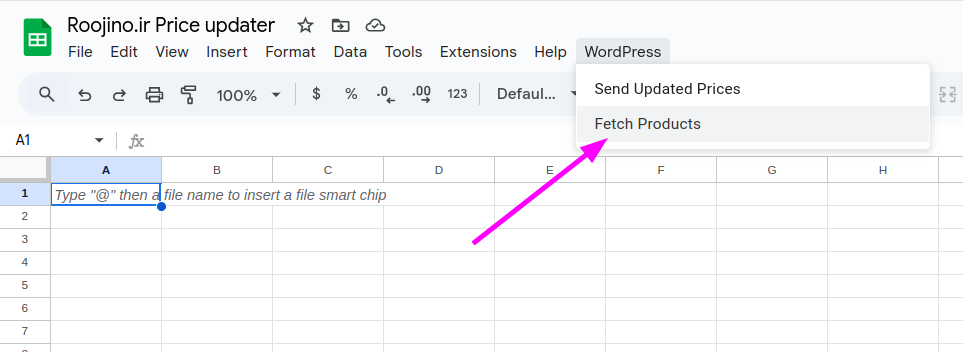
پس از اتمام کار پیغام Product fetching complete را دریافت خواهید کرد.
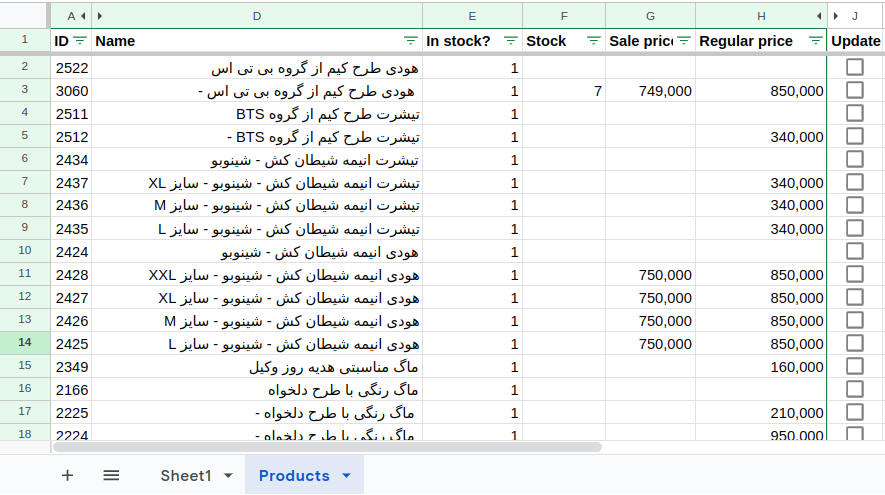
اکنون میتوانید قیمت محصولات را در گوگل شیت بروز رسانی کنید.
- در ستون In stock میتوانید موجودی محصول را کنترل کنید، عدد ۱ به معنای موجود و ۰ به معنای ناموجود است.
- در ستون Stock میتوانید تعداد محصولات موجود در انبار را وارد کنید.
- در ستون Regular price قیمت عادی محصول را وارد کنید.
- در ستون Sale price قیمت محصول تخفیف خورده را وارد کنید.
با تغییر هر یک از ستونهای بالا، ستون Update در آن ردیف تیک خواهد خورد، اطلاعات درج شده در ردیفهای تیک خورده به وبسایت ارسال خواهند شد.
پس از اتمام آپدیت قیمتها از منوی WordPress روی Send Updated Prices کلیک کنید تا پروسه آپدیت قیمتهای سایت آغاز شود. بسته به تعداد محصولات شما این پروسه میتواند از چند ثانیه تا چند دقیقه طول بکشد.
نکته: اگر از افزونه کش استفاده میکنید بعد از هر آپدیت قیمت کش سایت خود را حذف کنید.
نمایش کد (V1)
function updateProductPricesCaller() {
  var consumerKey = '000000000000000000';
  var consumerSecret = '000000000000000000';
  var siteUrl = 'https://your_site_url/';
  updateProductPrices(consumerKey, consumerSecret, siteUrl);
}

function onOpen() {
  var ui = SpreadsheetApp.getUi();
  ui.createMenu('WordPress')
    .addItem('Synchronize Prices', 'updateProductPricesCaller')
    .addToUi();
  refreshUpdateColumn();
}

function refreshUpdateColumn() {
  var sheet = SpreadsheetApp.getActiveSpreadsheet().getActiveSheet();
  var lastColumn = sheet.getLastColumn();
  var headers = sheet.getRange(1, 1, 1, lastColumn).getValues()[0];
  var updateColIndex = headers.indexOf("Update") + 1; // Get the index of the Update column (1-based index)

  // If the Update column exists, delete it
  if (updateColIndex > 0) {
    sheet.deleteColumn(updateColIndex);
  }

  // Add the new Update column with checkboxes
  lastColumn = sheet.getLastColumn(); // Update lastColumn after potential deletion
  sheet.insertColumnAfter(lastColumn);
  sheet.getRange(1, lastColumn + 1).setValue("Update");

  // Add checkboxes for each row in the new "Update" column
  var dataRange = sheet.getRange(2, lastColumn + 1, sheet.getLastRow() - 1, 1);
  dataRange.insertCheckboxes();
}

function onEdit(e) {
  var sheet = e.source.getActiveSheet();
  var range = e.range;

  // Get the edited cell's row and column
  var row = range.getRow();
  var col = range.getColumn();

  // Get the last column and the position of the "Update" column
  var lastColumn = sheet.getLastColumn();
  var headers = sheet.getRange(1, 1, 1, lastColumn).getValues()[0];
  var updateCol = headers.indexOf("Update") + 1; // Add 1 because headers is zero-indexed

  // Check if the edited cell is in the Sale Price or Regular Price column
  var priceColumns = [4, 5, 6, 7]; // Adjust based on the actual column positions
  if (priceColumns.indexOf(col) !== -1) {
    // Get the checkbox cell
    var checkboxCell = sheet.getRange(row, updateCol);

    // Check the checkbox
    checkboxCell.setValue(true);
  }
}

function updateProductPrices(consumerKey, consumerSecret, siteUrl) {
  var sheet = SpreadsheetApp.getActiveSpreadsheet().getActiveSheet();
  var dataRange = sheet.getDataRange();
  var data = dataRange.getValues();

  var idCol = 0;
  var typeCol = 1;
  var regularPriceCol = 5;
  var salePriceCol = 4;
  var variationRegularPriceCol = 5;
  var variationSalePriceCol = 4;
  var updateCol = data[0].indexOf("Update"); // Get the actual column index of "Update"

  var simpleBatch = [];
  var variationBatches = {};
  var batchSize = 100; // Maximum number of products to update in one batch

  for (var i = 1; i < data.length; i++) { // Start from 1 to skip the header row
    var productId = data[i][idCol];
    var productType = data[i][typeCol];
    var regularPrice = data[i][regularPriceCol];
    var salePrice = data[i][salePriceCol];
    var variationRegularPrice = data[i][variationRegularPriceCol];
    var variationSalePrice = data[i][variationSalePriceCol];
    var update = data[i][updateCol];

    if (update) {
      if (productType === 'simple') {
        simpleBatch.push({
          id: productId,
          regular_price: regularPrice ? regularPrice.toString() : "",
          sale_price: salePrice ? salePrice.toString() : ""
        });

        if (simpleBatch.length >= batchSize) {
          sendBatchRequest(simpleBatch, siteUrl + 'wp-json/wc/v3/products/batch', consumerKey, consumerSecret);
          simpleBatch = [];
        }
      } else if (productType === 'variation') {
        var variationId = productId;
        var parentId = findParentProductId(data, variationId, idCol, typeCol);

        if (!variationBatches[parentId]) {
          variationBatches[parentId] = [];
        }

        variationBatches[parentId].push({
          id: variationId,
          regular_price: variationRegularPrice ? variationRegularPrice.toString() : "",
          sale_price: variationSalePrice ? variationSalePrice.toString() : ""
        });

        if (variationBatches[parentId].length >= batchSize) {
          sendBatchRequest(variationBatches[parentId], siteUrl + 'wp-json/wc/v3/products/' + parentId + '/variations/batch', consumerKey, consumerSecret);
          variationBatches[parentId] = [];
        }
      }

      sheet.getRange(i + 1, updateCol + 1).setValue(false); // Uncheck the checkbox after updating
    }
  }

  // Send any remaining requests in the batches
  if (simpleBatch.length > 0) {
    sendBatchRequest(simpleBatch, siteUrl + 'wp-json/wc/v3/products/batch', consumerKey, consumerSecret);
  }

  for (var parentId in variationBatches) {
    if (variationBatches[parentId].length > 0) {
      sendBatchRequest(variationBatches[parentId], siteUrl + 'wp-json/wc/v3/products/' + parentId + '/variations/batch', consumerKey, consumerSecret);
    }
  }
}

function findParentProductId(data, variationId, idCol, typeCol) {
  var parentId = variationId - 1;

  while (parentId > 0) {
    for (var i = 1; i < data.length; i++) {
      if (data[i][idCol] == parentId && data[i][typeCol] == 'variable') {
        return parentId;
      }
    }
    parentId--;
  }

  return null; // or throw an error if the parent product ID is not found
}

function sendBatchRequest(batch, url, consumerKey, consumerSecret) {
  var payload = {
    update: batch
  };

  var options = {
    method: "POST",
    contentType: "application/json",
    payload: JSON.stringify(payload),
    headers: {
      "Authorization": "Basic " + Utilities.base64Encode(consumerKey + ":" + consumerSecret)
    }
  };

  try {
    var response = UrlFetchApp.fetch(url, options);
    Logger.log("Batch update successful: " + response.getContentText());
  } catch (error) {
    Logger.log("Error in batch update: " + error.message);
  }
}



پاسخ دادن به سینا لغو پاسخ